A social media workflow for a small team comes down to four decisions, made once and written down: who holds which role (one person may hold several), which six statuses a post moves through, who hands what to whom by which deadline, and what happens when the approver is not there. Add a fixed weekly rhythm and one task card per post, and a team of three can run it without a heavy tool.
Tareno publishes this guide and offers a product discussed here. The worked examples are illustrative; this article does not report a connected-account test or measured customer results.
TL;DR
- Give every post an owner, an approver and a publisher. Nobody approves their own text. If a rule must bend because only three people exist, name the exception in writing.
- Use six working statuses: Brief ready, Draft, Design, Review, Approved, Scheduled. Published is the closing marker.
- Write each handoff as "who, to whom, by when". Stagger deliveries so the approver never gets everything at once.
- Define exactly one backup deadline and what the backup may and may not approve. The text is approved before design starts, so the backup only releases the layout. Silence never counts as approval.
- Review the setup after week one and after four weeks, using turnaround per status and revision rounds.
Quick definition
A social media workflow is the agreed path a post takes from brief to published, including who owns each stage and how long it may wait there. For the full 13-stage pipeline with repurposing and archive, see our content workflow template guide; this article covers only the setup for two to four people.
The example used throughout
Hopfenwerk Taproom is a made-up craft brewery taproom, and this is a constructed teaching example: no real customer, no measured results, all dates and times are illustrative. Its marketing team has three people:
- The manager runs the taproom in shifts, so a deadline can fall in the middle of a shift, and decides everything in the end.
- The designer works part-time, on Tuesdays and Thursdays, and delivers graphics by chat.
- The freelancer writes copy, takes photos, publishes, and bills by the hour, so every task in the plan has a time budget.
Current state: copy is approved in a chat thread, nobody knows which version counts, the designer hears about events too late, and every approval waits for the manager. The event is a fresh-hop release on Saturday, 21 November 2026 (calendar week 47). The planned content: an announcement carousel, a Reel, three Story frames and a recap photo.
Step 1: Assign roles, including double roles
With three people, one person holds several roles. That is fine. Prolifik's approval guide says that for small teams one person may hold several roles, and that each role still answers a different question at its gate. So write down the question each role answers, then check that nobody answers "is this good?" about their own work.
| Role | Taproom person | Question it answers | Does not do |
|---|---|---|---|
| Owner and final approver | Manager | "Do we say this, and is it true?" Approves the copy text before design starts; also checks any statement about alcohol. | Write or design the post |
| Creator and publisher | Freelancer | "What is the brief, and what does the copy and photo say?" Schedules and publishes. | Approve their own copy |
| Design and quality check | Designer | "Is it on brand and legible?" | Approve text, prices or age statements; she may only confirm that the graphic matches the approved copy |
One exception is built in and named in step 3: the designer can release the layout of one post when the manager has not decided by the deadline. She made that layout, so this is a deliberate bend of the "no self-approval" rule. The text is not part of it, because the manager approved the text before design started. The exception is limited to layout, to one deadline, and it is reported the same day.
Step 2: Fix six statuses
Longer status lists exist, but with three people each extra status is one more place to forget a post. Six working statuses are enough here. Internal review and compliance review fall together because the same person, the manager, does both.
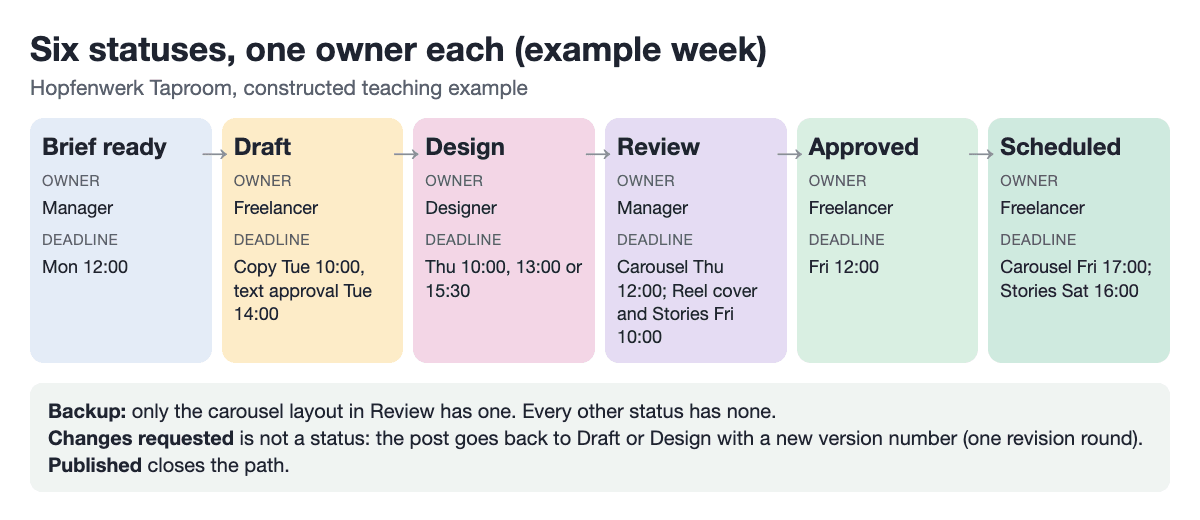
| Status | Owner while in this status | Leaves the status when | Deadline in the example week | Backup |
|---|---|---|---|---|
| Brief ready | Manager | Brief with goal, core statement, format and date is posted | Mon 12:00 | None |
| Draft | Freelancer | Copy and photo selection are in the card and the manager has approved the text | Copy Tue 10:00, text approval Tue 14:00 | None; the text always waits for the manager |
| Design | Designer | Graphic is uploaded and matches the approved copy version | Thu 10:00, 13:00 or 15:30 by post | None |
| Review | Manager | Manager approves or asks for changes; for the carousel only, the designer releases the layout after the one deadline (step 3) | Carousel Thu 12:00; Reel cover and Stories Fri 10:00 | Carousel layout only |
| Approved | Freelancer | Freelancer has scheduled the post | Fri 12:00 | None |
| Scheduled | Freelancer | Post is live (then mark it Published) | Carousel Fri 17:00; Stories Sat 16:00 | None |
"Changes requested" is not a seventh status. The post goes back to Draft or Design with a new version number, and you count that as one revision round.
In Tareno, Content Boards describe custom Kanban columns and cards with an assignee and a due date, which maps directly to this table. A spreadsheet with the same six values in a drop-down does the same job; the statuses matter more than the tool.
A cloud agent can prepare cards from approved source files using the files-to-draft-batch workflow. Keep the named person responsible for content approval; generating a draft does not authorize scheduling.
Step 3: Write handoffs with deadlines and a backup
A handoff is a sentence: who gives what to whom by when. Sprinklr lists undefined handoffs and version chaos among typical workflow mistakes, so every row below has an owner and a time.
Deadlines should be realistic rather than invented. As a reference point only, Hootsuite's example approval template puts the draft 48 hours before publishing and the review within 24 hours, and says one to two revision rounds are normal while three or more suggest tightening the brief. Our deadlines are compatible with that example. The carousel goes live on Friday at 17:00 and the draft is due Tuesday at 10:00:
Tuesday 10:00  ->  Friday 17:00
Tue 10:00 to Fri 10:00 = 3 days x 24 h = 72 h
Fri 10:00 to Fri 17:00 =                  7 h
Draft lead time                          = 79 h  (more than 48 h)
Review: delivered Thu 10:00, decision due Thu 12:00 = 2 h (within 24 h)
The handoff table for the example week:
| Handoff | From, to | Deadline | If the deadline is missed |
|---|---|---|---|
| Brief | Manager to freelancer | Mon 12:00 | Freelancer asks in the weekly thread; no drafting without a brief |
| Copy and photo selection | Freelancer to manager | Tue 10:00 | Reported in the thread; design waits for approved copy |
| Text approval | Manager to designer | Tue 14:00 | Post stays in Draft; no backup for text |
| Carousel delivery | Designer to review | Thu 10:00 | Reported in the thread before 10:00 |
| Reel cover delivery | Designer to review | Thu 13:00 | Same |
| Story frames delivery | Designer to review | Thu 15:30 | Same |
| Carousel layout decision | Manager | Thu 12:00 | Backup rule below |
| Reel cover and Story frames decision | Manager | Fri 10:00 | Freelancer phones the manager; not scheduled until decided |
| Scheduling | Freelancer to Scheduled | Fri 12:00 | Manager is told which posts are not set |
The three Thursday deliveries are staggered on purpose. Three files at 11:00 would hand a manager on shift three reviews in one block; spaced deliveries mean each one can be decided as it arrives.
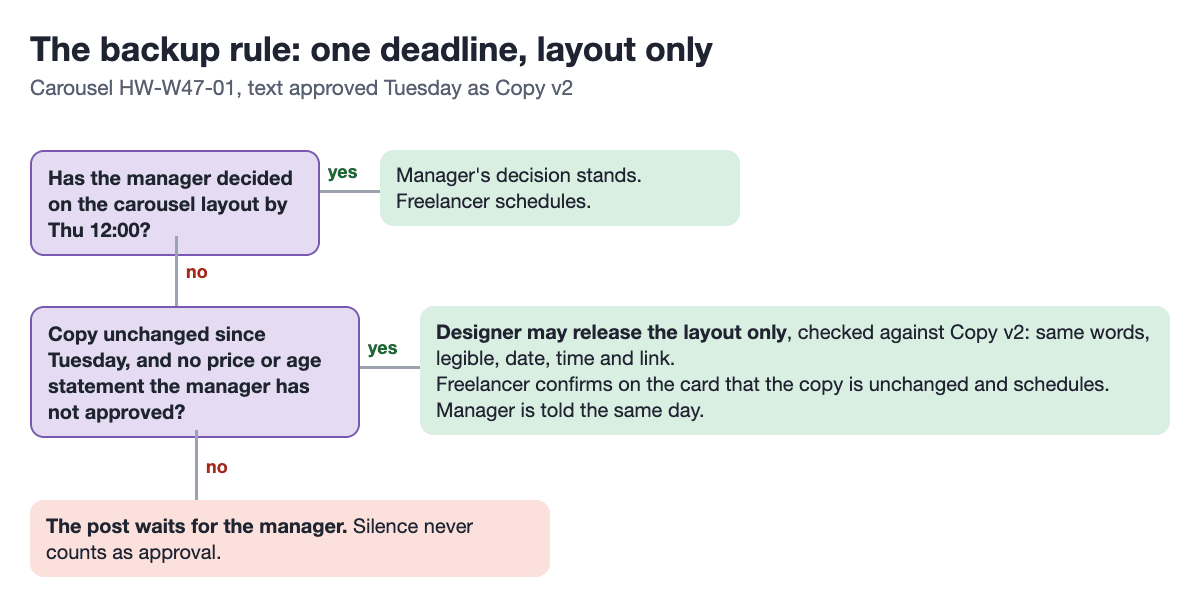
The backup rule (one deadline). The manager approves the carousel text on Tuesday, before design starts, and the card records it as Copy v2. If the manager has not decided on the carousel layout by Thursday 12:00, the designer may release the layout, checking it only against Copy v2: same words, legible, date, time and link as in the approved copy. The freelancer confirms on the card that the copy is unchanged since Tuesday and schedules the post. The manager is told the same day. If the copy changed after Tuesday, or the post carries a price or age statement the manager has not approved, the post waits for the manager. So nobody approves their own text: the manager approved it, and the designer's release covers the layout only.
Why only the carousel? It is the one post that goes live on Friday, and its text is already approved. The Reel cover and Story frames go out on Saturday, so a decision by Friday 10:00 still leaves time. If that is missed, the freelancer phones the manager and nothing is scheduled; that is a decision date, not a second backup. A backup who acts is a person taking a decision, which is different from silence turning into approval; Shally's guidance states that silence should not move a post to Approved. This rule is a proposal for the example, not a standard.
Tareno's Approval Workflows page describes approval levels by role, the statuses Pending, Approved, Rejected and Changes Requested, a 24-hour reminder, automatic scheduling after approval and an audit log. The page does not describe a stand-in approver, so the backup rule above is a team agreement, not a product feature. Check the pricing page for which plan includes approvals before you plan around them.
For a larger client-facing process, compare the approval workflow setup guide with this limited three-person arrangement instead of extending the backup’s authority informally.
Step 4: Lay out the week, Monday to Sunday
Fix the rhythm once so each person knows when their work lands. This is the full event week for the example team:
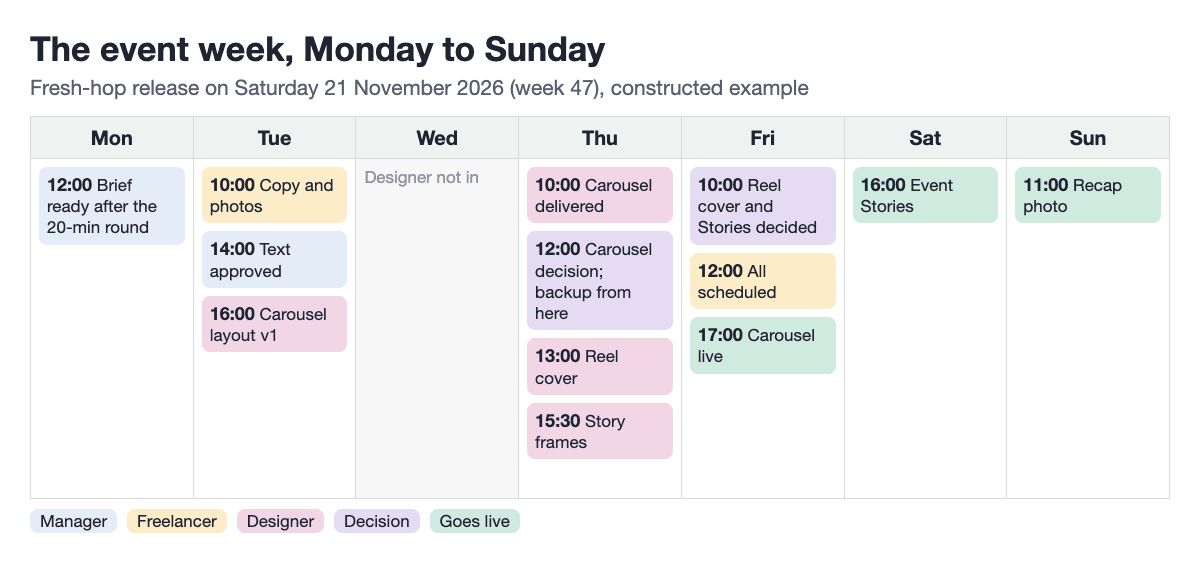
| Day | Task | Owner | Status afterwards | Deadline |
|---|---|---|---|---|
| Mon | 20-minute weekly round: event, core statement, list of posts | Manager | Brief ready | 12:00 |
| Mon to Tue | Copy and photo selection, then text approval | Freelancer, then manager | Draft | Tue 10:00 / 14:00 |
| Tue | Carousel layout, first version, on the approved copy | Designer | Design | Tue 16:00 |
| Thu | Finish and deliver carousel, then decision (backup from 12:00) | Designer, manager | Review, then Approved | 10:00 / 12:00 |
| Thu | Lay out and deliver Reel cover and Story frames | Designer | Review | 13:00 / 15:30 |
| Fri | Schedule the posts and run a live check | Freelancer | Scheduled | 12:00 |
| Sat | Event Stories go out | Freelancer | Published | 16:00 |
| Sun | Post the recap photo, note the week's figures | Freelancer | Published | 11:00 |
| Next Mon | 15-minute review: turnaround per status, revision rounds | Manager | Process adjusted | 12:00 |
Because the freelancer bills by the hour, the weekend tasks and the Monday round are small, fixed blocks (the round stays at 20 minutes), so the hours can be estimated in advance. Tareno's Post Scheduling page offers calendar views, but it also says the tool is not ideal for spontaneous, real-time publishing without calendar-based planning, which matters if your team posts mostly in the moment.
Step 5: Fill in one task card per post
One card per post prevents the "which version counts" problem. Sprout Social's first workflow tip is to document the process as an SOP with roles; the card is that SOP at post level. Here is the carousel, filled in:
Post ID:        HW-W47-01
Goal:           Table reservations for the release evening
Format:         Carousel (5 slides)
Channel:        Instagram
Owner:          Manager
Status:         Review
Version:        Copy v2 (text approved by manager, Tue) / Graphic v1
Deadline:       Thu 12:00 (layout decision)
Approver:       Manager
Backup:         Designer, layout only, checked against Copy v2, from Thu 12:00
Publisher:      Freelancer
Publish time:   Fri 17:00
Live link:      (added after publishing)
Thirteen fields are enough: Post ID, goal, format, channel, owner, status, version, deadline, approver, backup, publisher, publish time and live link. The version line is the one that settles chat arguments.
Keep approved media and the approved copy version together. The media library guide covers asset organization; an asset’s presence in the library is not evidence that the post has approval.
Step 6: Review after one week and after four
Your first setup will be wrong in places. Sprinklr says a basic workflow can be mapped in one day, while refining usually takes a few content cycles; that is a vendor's view, but it matches the plan to treat week one as a trial.
Use the 15-minute Monday review for three questions:
- How long did posts sit in each status? Prolifik names turnaround per status among its metrics.
- How many revision rounds did each post need? Compare against the range cited in step 3.
- How often did something change after approval? Prolifik calls this the late-change rate; count it simply as edits made after Approved.
Decide one adjustment per review: move a deadline, tighten the brief, or change who holds a role. Four weeks is long enough to see whether a pattern repeats.
If you want a shared performance review, the analytics and reports guide can help define the reporting task. Continue tracking workflow turnaround separately from audience performance.
Common mistakes
- Approving in the chat thread. The decision exists, but the card does not show it. Change the status on the card, then post.
- A backup with no limits. If the stand-in can approve anything, you have two final approvers. Write down what is excluded.
- Several backup deadlines. One deadline is enough for a three-person team; each extra stage needs someone to watch it.
- Deliveries stacked on the part-timer's busiest day. Plan around her days, not around the approver's wish for one batch.
- Changing the copy after approval without changing the card. The backup rule only works against the approved version; an unrecorded edit means the designer checks the wrong text.
When to use this setup, and when not
| Use it when | Do not use it when |
|---|---|
| You are two to four people with at least one part-timer or freelancer | Legal or compliance review by a separate department is required |
| Posts are planned a few days ahead | Most posts are spontaneous and real-time |
| Approval currently depends on one busy person | You manage many client accounts with client sign-off (that needs a separate agency setup) |
Key takeaways
- Roles may overlap, but each role must answer a different question.
- Six statuses, each with an owner and an exit condition, are enough for three people.
- Every handoff needs who, to whom, by when, and what happens if it is missed.
- One backup deadline with a clear limit beats a chain of escalations.
- Review after week one and after four weeks, and change one thing at a time.
FAQ
How many statuses does a small team need?
Six working statuses are a workable start: Brief ready, Draft, Design, Review, Approved and Scheduled, with Published as the closing marker. Add one only when a post repeatedly stalls in a place no status describes.
Can the same person write and approve a post?
Avoid it. With three people it is sometimes unavoidable for a minor piece. If so, write it as a named exception in the card's Approver field (for example "Freelancer, exception") so the team can count how often it happens.
What should happen when the approver is on shift or unavailable?
Have the approver sign off the text early, then set one deadline after which a named backup may release only the layout against that approved text, and tell the approver the same day. Exclude anything the backup cannot judge, such as prices or age statements.
Do we need a tool to run this workflow?
No. A shared spreadsheet or board with the six statuses works. Shally recommends starting with a spreadsheet, and a dedicated tool pays off once the volume or the number of handoffs makes manual tracking error-prone.
How long does it take to set up?
Sprinklr says a basic workflow can be mapped in a day and refining usually takes a few content cycles. Plan one working session for the roles, statuses and handoffs, then use the reviews to adjust.
How often should we change the workflow?
Review after the first week, then after four weeks, then when a pattern shows up in the metrics: long waits in one status, revision rounds above the range you set, or frequent edits after approval.
Conclusion
Write down the roles, six statuses, handoffs with deadlines and one backup rule, put them on a card per post, and review after a week. If you want to run this on a board with approvals and a calendar, you can try the setup in Tareno after checking which plan includes approvals.